How to Enable Lossless Audio in Apple Music on Any Device
Lossless streaming is free but turned off by default, and Bluetooth limitations vary sharply between iPhones and Android devices.
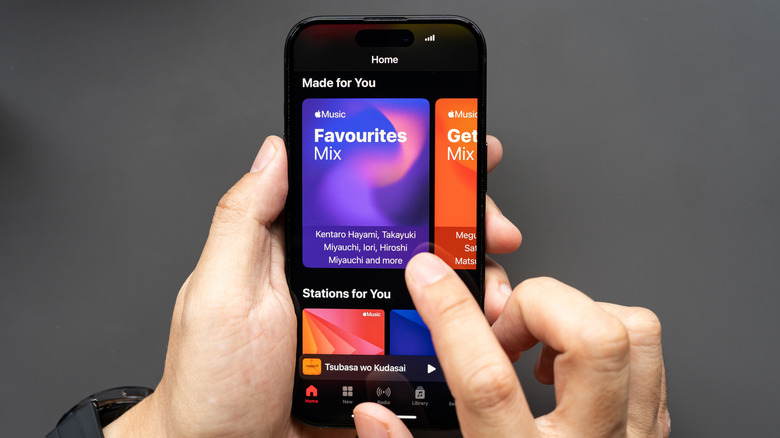
Apple Music subscribers paying for the service do not automatically receive its highest audio quality. Lossless streaming remains disabled by default across every platform, requiring manual activation on each individual device. Without adjusting these settings, listeners receive standard compressed AAC streams regardless of their hardware capabilities or subscription tier.
Unlike Spotify, which has repeatedly delayed its promised HiFi tier since announcing it in early 2021, Apple includes lossless and high-resolution lossless audio at no additional cost beyond the standard $10.99 monthly individual subscription. The catalog covers over 100 million tracks encoded in ALAC (Apple Lossless Audio Codec). This positions Apple Music as one of the few mainstream streaming platforms—alongside Tidal, Qobuz, and Amazon Music Unlimited—delivering uncompressed audio without charging a premium tier surcharge.
Understanding what the two available tiers actually deliver prevents unnecessary data consumption. The standard Lossless tier streams at 24-bit depth and up to 48kHz, matching CD-quality resolution and exceeding it in bit depth. The Hi-Res Lossless tier pushes those specifications to 24-bit/192kHz. Activating the higher tier provides zero audible benefit when listening through standard consumer headphones, wireless earbuds, or built-in laptop speakers. It exclusively serves users with dedicated digital-to-analog converters (DACs) and wired audiophile-grade equipment capable of processing that sample rate.


A critical hardware limitation separates Android and iPhone users attempting to stream lossless audio wirelessly. iOS does not support high-resolution Bluetooth codecs such as LDAC or aptX HD. Apple relies on its proprietary AAC codec for Bluetooth transmission, meaning AirPods—even the latest models—cannot transmit true lossless audio from an iPhone. Achieving lossless playback on iOS requires a wired connection. Android devices supporting LDAC or similar high-bandwidth codecs can transmit Apple Music’s standard lossless tier wirelessly to compatible headphones, giving non-Apple mobile users a distinct technical advantage in portable high-fidelity listening.
Enabling lossless streaming on iOS requires navigating through Settings > Apps > Music > Audio Quality, then toggling Lossless Audio. Users must independently select their preferred resolution for cellular streaming, Wi-Fi streaming, and local downloads on this same screen. Leaving cellular streaming set to Hi-Res Lossless will rapidly exhaust mobile data caps; a single three-minute track at 24-bit/192kHz consumes roughly 36 megabytes compared to about 1.5 megabytes for standard AAC.
On Android, the configuration lives inside the Apple Music app itself. Access the three-dot menu on the home screen, open Settings, tap Audio Quality, and enable the lossless toggle. The application triggers a specific warning prompt if Hi-Res Lossless is selected, alerting users to the external hardware requirement before confirming the change.
Desktop configurations follow different paths depending on the operating system. On macOS, open the native Apple Music app, navigate to Music > Settings in the menu bar, select the Playback tab, and check the box to enable lossless audio. Windows 11 users running the native Apple Music application access these controls by clicking the three horizontal dots near the logo in the left navigation pane, opening Settings, and selecting the desired resolution from dropdown menus under both Streaming and Downloads.
Fine-tuning frequency response through the equalizer introduces another platform divergence. The desktop applications on both Mac and Windows feature a robust 10-band EQ accessible via Window > Equalizer on macOS or the same three-dot settings menu on Windows. Both desktop versions include a preamp slider and allow saving custom curves as new presets. iOS hides its equalizer presets under Settings > Apps > Music > EQ. Android lacks an in-app equalizer entirely; selecting the equalizer option within Apple Music redirects the user to the phone’s system-level audio settings instead.
Data management remains the primary reason Apple keeps lossless disabled out of the box. Streaming at 24-bit/48kHz consumes approximately six times more bandwidth than standard high-efficiency AAC encoding. Users managing limited broadband plans or downloading large offline libraries for travel should configure cellular and download settings to standard lossless or lower, reserving Hi-Res Lossless strictly for unmetered home Wi-Fi networks connected to appropriate playback gear.
Apple expanded the availability of Spatial audio with Dolby Atmos alongside its lossless rollout, though the two technologies operate independently. Spatial Audio relies on object-based metadata rather than raw bitrate increases, meaning users can enable immersive surround formats without necessarily activating the bandwidth-heavy lossless tiers. Both features are controlled separately within the same audio settings menus across all supported platforms.