Windows 11 Can Now Rebuild a Bricked PC From the Cloud
Microsoft moves Windows recovery from USB drives to the cloud
REDMOND, Wash. — Microsoft has introduced Cloud Rebuild, a Windows 11 capability that lets a bricked PC rebuild itself entirely over an internet connection, removing the need for physical recovery media after catastrophic operating system failures.
The feature debuted in Windows 11 Insider Beta Preview Build 26220.9343. It moves system recovery away from local storage partitions and external USB drives and toward Microsoft’s cloud servers, affecting how consumer and enterprise PCs can be restored to factory settings.
Cloud Rebuild operates inside the Windows Recovery Environment (WinRE), a minimal operating system based on the Windows Preinstallation Environment (Windows PE). WinRE loads after a PC fails to boot multiple times. Users can also open it manually by going to Settings, selecting System, choosing Recovery, and clicking “Restart now” under Advanced Startup options.


The new mechanism addresses a limitation that remained after Microsoft introduced “Reset this PC” in Windows 8 and added “Cloud Download” in Windows 10 Version 2004, released in 2020. Those tools were designed mainly to run from within a functioning operating system. A computer that could not boot still required a separate working computer to download Microsoft’s Media Creation Tool and create a bootable recovery image on a USB flash drive.
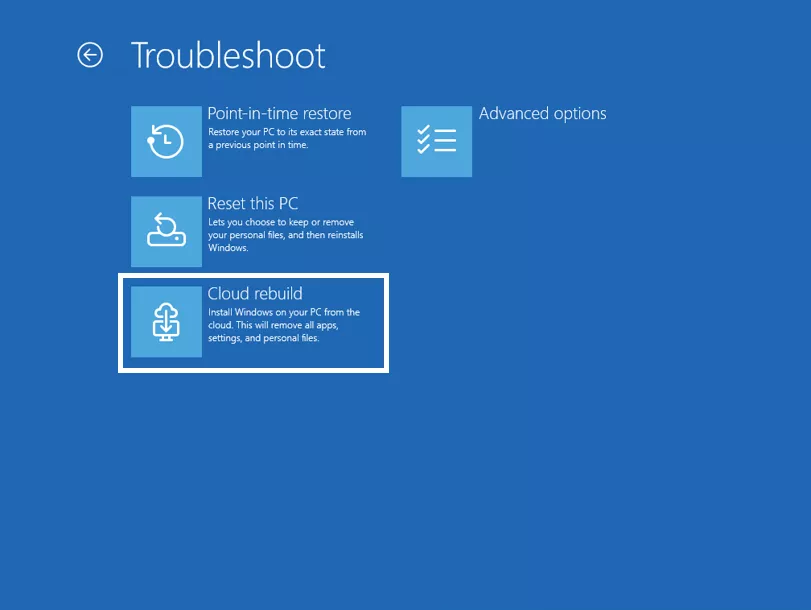
Once in the recovery interface, the user selects “Troubleshoot,” then “Reset this PC,” where the “Cloud Rebuild” option is located. After it starts, the utility connects to Microsoft’s servers and downloads a clean, factory-validated copy of the specific Windows build, edition, and language licensed to the machine.
For decades, recovery depended on physical media. Windows 95 and Windows 98 users relied on floppy boot disks and installation CDs, while OEMs had moved to dedicated hard-drive recovery partitions by the Windows XP and Windows 7 era. Those partitions removed the need for CDs but used valuable storage space and became useless when the physical drive failed or suffered severe corruption.
Cloud Rebuild also restores the drivers needed for network cards, audio, and display adapters. Manual clean installations can leave a computer without those basic functional drivers, whereas the cloud utility restores them during recovery so the machine restarts with full basic functionality intact.
Several gigabytes of operating system data must be downloaded, making network connectivity a prerequisite. Recovery environments have historically been difficult to use over wireless networks because of driver limitations and their inability to access saved Wi-Fi credentials, often forcing users to connect a physical Ethernet cable.
Build 26220.9343 adds automatic migration and caching of Wi-Fi profiles from the active Windows installation into WinRE. The recovery environment can therefore authenticate automatically to known wireless networks without requiring users to enter security keys manually. Functional network drivers compatible with the Recovery Environment are still required to establish the initial handshake.
For corporate IT departments supporting remote or hybrid workforces, shipping USB drives or recalling laptops for re-imaging creates a significant administrative expense. At present, Cloud Rebuild requires direct physical access to the device or local execution through an elevated command prompt by a local administrator.
Microsoft plans to extend the feature to remote deployment through enterprise endpoint management solutions, specifically Microsoft Intune. Managed devices using Windows Autopilot, OneDrive, and Backup for Organizations already have basic cloud-based recovery options; bringing Cloud Rebuild to the pre-boot WinRE level would let IT administrators salvage completely non-responsive endpoints remotely and reduce the need to ship hardware.

Build 26220.9343 also updates parts of the Windows 11 interface. The AutoPlay dialog now uses Microsoft’s modern WinUI framework, supports light and dark modes, and offers improved text scaling for accessibility.
The personalization menu gains improved preview settings so users can see changes before applying them. Windows 11 also supports Device Independent Bitmap (DIB) files as desktop backgrounds.
File Explorer’s address bar now accepts double backslashes and quotation marks, reducing path resolution errors when navigating complex network directories or local folders. Microsoft has also adjusted tracking in the system magnifier and integrated updated emojis.
The build includes a new Microsoft OneDrive promotion that prompts users to configure automatic photo and video backups from connected mobile devices.