Opera Air Browser Adds Soundscapes and Breathing Tools
Built-in ambient audio and scheduled wellness prompts expand the desktop browser's anti-distraction architecture.
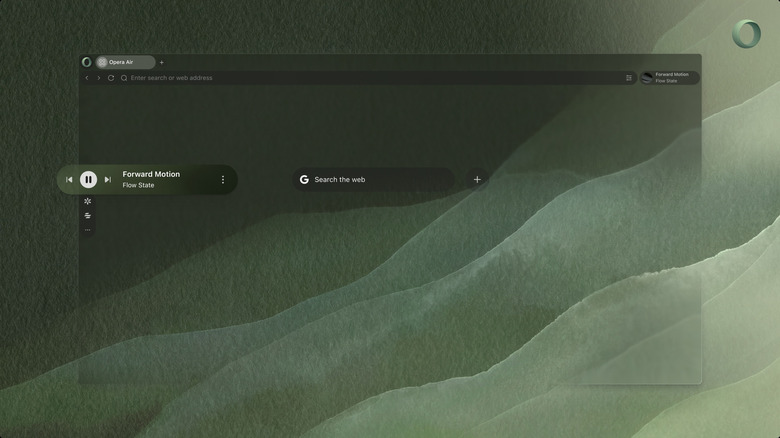
Opera has expanded its distraction-blocking browser, Opera Air, with built-in ambient audio, scheduled breathing exercises, and a visual overhaul aimed at reducing digital fatigue for desktop users. The update targets the growing market of professionals seeking software that actively limits internet distractions rather than simply organizing them.
The most prominent addition is Air Soundscapes, a native audio engine delivering four distinct listening environments: Focus, Relax, Work, and Ambience. Unlike third-party browser extensions that stream white noise or lo-fi beats—often consuming significant RAM and battery life—these soundtracks are integrated directly into the application. The Ambience setting generates environmental audio such as ocean waves and forest acoustics without requiring external streaming services or continuous network requests.
Beyond audio, the browser now prompts users to engage in physical wellness routines during browsing sessions. Users can schedule guided breathing exercises to interrupt their workflow at custom intervals, alongside on-screen neck stretch guides. These features reflect a broader shift in productivity software toward incorporating somatic interventions. While applications like Calm and Headspace have long offered guided breathing, embedding these tools directly into a web browser represents a departure from traditional productivity suites, which historically rely solely on time-blocking or site-restriction mechanics to maintain focus.


Architecturally, Opera Air operates differently from mainstream Chromium-based browsers like Chrome, Edge, or even Opera’s flagship product. Rather than loading a default suite of web apps and extensions, the sidebar remains empty upon installation. Users must manually opt in to add specific tools, enforcing a minimalist environment by default. Artificial intelligence integration follows this restrictive philosophy; while the browser interfaces with ChatGPT, the AI chatbot option remains unchecked unless the user explicitly activates it.
This stripped-down approach builds on the initial version of the browser launched in early 2025. At the time, Opera positioned the software as an antidote to algorithmic feeds and notification overload. The underlying strategy mirrors the rise of “dumb phones” and minimalist hardware devices like the Light Phone, translating that anti-distraction ethos into desktop software.
To support the streamlined interface, the latest release introduces new wallpapers utilizing natural textures, open spaces, and perspective-driven imagery, paired with an automatic dark mode that adjusts based on system settings or time of day. Network-level protections remain intact, including a native ad blocker and a free virtual private network (VPN) to prevent tracking and reduce the intrusive advertising that frequently derails focused browsing sessions.
Opera Air is available as a free download for Windows and macOS.