

Windows 11 Gets an Xbox Mode to Challenge SteamOS
Microsoft brings a console-style interface to Windows 11 handhelds
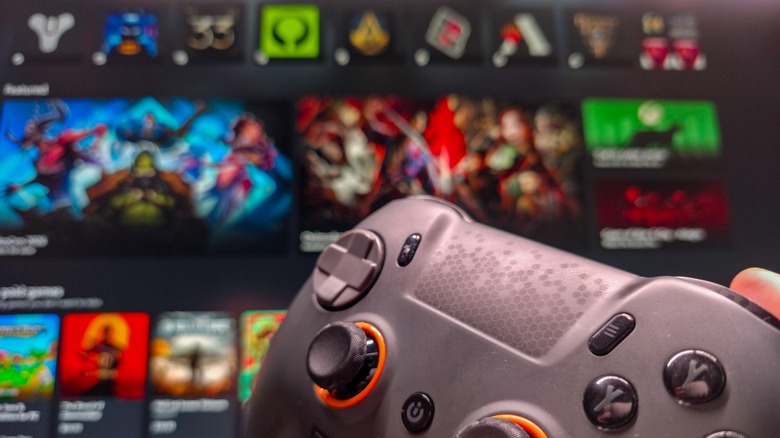
Microsoft has introduced a dedicated Xbox mode for Windows 11 as portable hardware and alternative operating systems reshape PC gaming. The feature is a direct software counter-offensive against Valve’s Linux-based SteamOS, which has gained traction among portable gaming enthusiasts and users seeking an alternative to the traditional Windows desktop ecosystem.
The shift became more apparent after Valve launched the Steam Deck in 2022. Devices such as the ASUS ROG Ally, Lenovo Legion Go, and MSI Claw continued to ship with Windows 11 for broad compatibility with PC game libraries, but users often criticized the operating system as clunky on small touchscreens without a keyboard and mouse. Manufacturers responded with proprietary overlays, including ASUS Armoury Crate SE and Lenovo Legion Space, to cover the desktop interface.


Microsoft places the new shell inside Windows settings at Settings > Gaming > Xbox mode. Turning on the “Xbox mode” slider reconfigures the user interface, while selecting “Xbox” as the primary home application and enabling “Enter Xbox mode on startup” can bypass the desktop whenever the system boots. The startup option is aimed particularly at portable handhelds and dedicated living room PCs.
SteamOS demonstrated to millions of gamers that a controller-first operating system could provide a highly optimized experience compared with a standard desktop environment. Linux gaming has also recorded a slow but steady rise in monthly Steam Hardware surveys, challenging Windows’ long-standing position.
Windows 11’s shell bypasses the usual taskbar and desktop, instead opening a full-screen interface powered by a redesigned Xbox application. It supports standard Xbox controllers, generic PC gamepads, and PlayStation controllers, allowing local systems to be navigated in a way similar to a home console.
Microsoft has added several routes for moving between the desktop and the gaming interface. Win + F11 switches instantly between the two environments. With “Show Xbox mode in Task View” enabled, Win + Tab displays an Xbox mode shortcut alongside active virtual desktops. Users can also select a dedicated button in the upper-right corner of the standard Xbox app or open Windows Game Bar with Win + G and use its settings gear icon.
A separate problem comes from the open nature of PC gaming. Players commonly maintain different libraries in Steam, the Epic Games Store, Battle.net, Ubisoft Connect, and the EA App. Xbox mode is intended to serve as a central launcher rather than a closed wall, combining installed games from Steam, Epic Games, Ubisoft Connect, Battle.net, and the Humble Launcher in one library view.
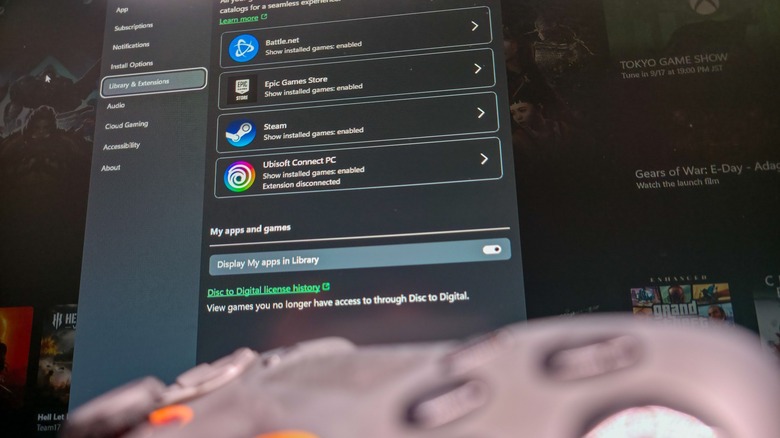
If a game does not appear automatically, its executable can be imported manually with the plus (+) icon in the Library tab. Selecting a game from the combined menu targets the direct executable path, while Windows starts the title’s native launcher silently in the background. That authentication process can create slight launch delays, so pre-opening third-party storefronts before entering Xbox mode is recommended.
Cloud gaming is included as well. The Xbox app is configured natively to promote Xbox Game Pass and its cloud gaming catalog, but Microsoft allows the default cloud streaming provider to be changed in the app’s settings. Users can therefore replace Microsoft’s cloud services with competitors such as Nvidia GeForce Now.
During gameplay, pressing the Windows key opens a specialized task view with the desktop and system shortcuts along the top of the screen. The standard desktop can be restored by selecting “Exit Xbox mode” in the upper-right corner of the Xbox app home screen or by pressing Win + F11 again.
Xbox mode remains an interface wrapper rather than a hardware-level performance upgrade. Performance optimization is handled separately by Microsoft’s dedicated Game Mode, found under Settings > Gaming > Game Mode, which prioritizes hardware resources for active games by limiting background processes.
Microsoft’s position had been supported for decades by DirectX API dominance and driver support, giving Windows an undisputed monopoly on PC gaming. Valve’s Proton has weakened that advantage by translating Windows-specific DirectX instructions to the open-source Vulkan API, enabling Linux to run thousands of Windows titles with minimal performance loss.
Xbox mode does not completely rewrite the PC gaming experience. It gives Windows 11 a built-in, controller-first shell that unifies fragmented storefronts as Microsoft attempts to counter Valve’s interface advantage and preserve its dominant position on portable hardware and home entertainment PCs.








One Comment