

Microsoft Pushes Warner Bros. Ads Through Official Windows Desktop App
Optional desktop app delivers studio movie promotion alongside daily photography, sparking user concerns over commercial advertising in the Windows ecosystem
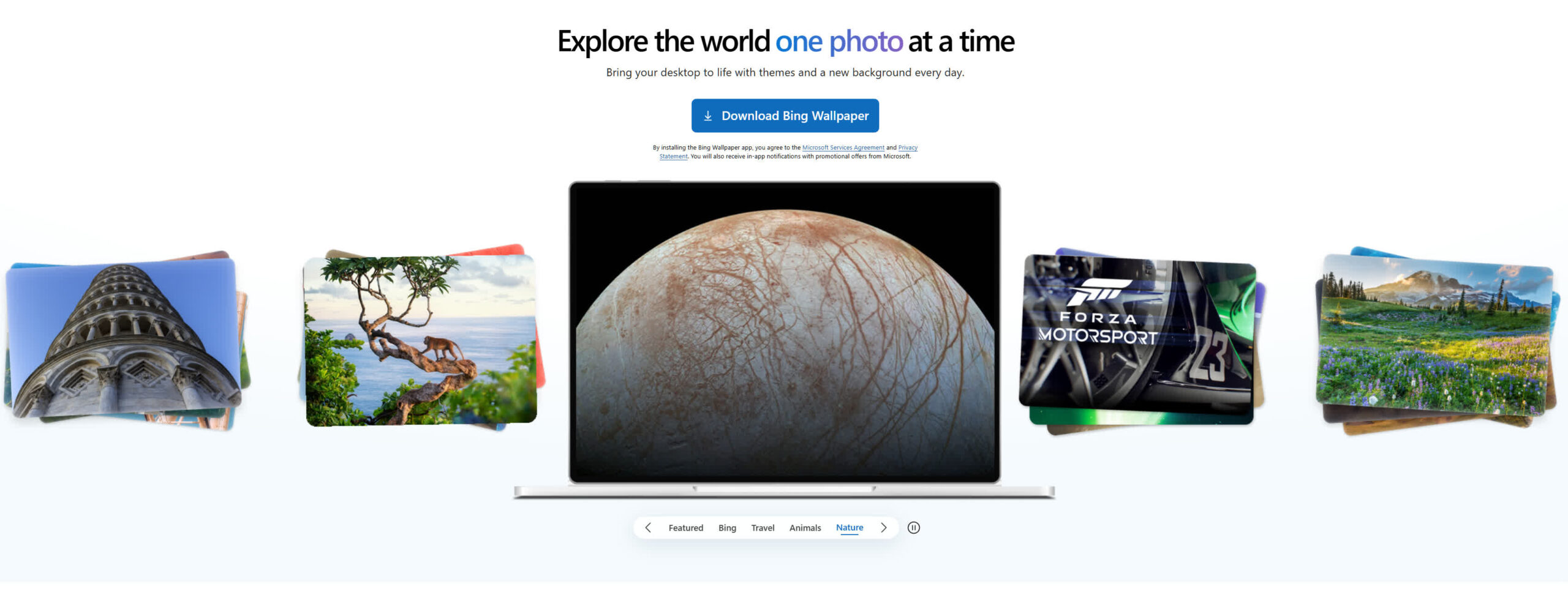
The optional Bing Wallpaper application, designed to automatically refresh desktop backgrounds with daily photography, served users a promotional graphic for Warner Bros.’ 11-film *Harry Potter* and *Fantastic Beasts* collection. The graphic featured an image of Hogwarts Castle alongside an “available now” message. The deployment marks a shift from Microsoft‘s typical practice of using OS-level real estate to promote its own first-party services—such as OneDrive, Microsoft Edge, and Xbox Game Pass—toward delivering external brand marketing.
First released by Microsoft in April 2020 as a standalone utility for Windows devices, the Bing Wallpaper app pulls high-resolution images from the Bing search engine homepage. Its catalog routinely rotates through photography categories including nature, wildlife, astronomy, sports, global architecture, and travel destinations.


The promotion coincided with broader commercial activity surrounding the franchise, following the 2023 release of Warner Bros. Games’ *Hogwarts Legacy*, which finished as the top-selling video game globally that year after selling more than 22 million units. The ad delivery comes after previous scrutiny regarding the background behavior and security mechanisms of the Bing Wallpaper application.
In 2024, cybersecurity research disclosed that the software’s installer silently packaged additional background utilities, including Bing Visual Search components. The analysis also identified program code capable of accessing and decrypting web browser cookies stored on local drives. In response to the research, Microsoft stated that the application did not decrypt “all user Edge and Chrome cookies,” though the company did not address its software’s interaction with third-party browsers like Mozilla Firefox.
The sudden shift to commercial media content prompted reports and inquiries across online technical forums. On the Microsoft Learn support portal, users posted inquiries regarding whether commercial advertisements were becoming a permanent component of the utility and asked if opt-out settings existed to prevent future promotions without deleting the app. Parallel threads appeared on community platforms including Thurrott.com and Reddit, where users expressed concern that the unexpected desktop overlay was the result of unwanted adware.
The use of desktop space for third-party marketing extends a long-standing effort by Microsoft to introduce revenue-generating elements into its desktop operating system. Shortly after the launch of Windows 10, Microsoft utilized its Windows Spotlight lock screen feature to display ads for third-party games, including *Rise of the Tomb Raider*. In the same year’s Anniversary Update, the company doubled the maximum number of default promoted apps in the Start menu from five to ten.
In March 2022, Microsoft tested promotional banners inside the native Windows 11 File Explorer application, displaying ads for Microsoft Editor and OneDrive storage plans to Windows Insider test builds. In 2023, account-level promotional prompts were added to the Start menu profile interface, encouraging users to create Microsoft accounts or configure cloud backups.
In April 2024, Microsoft issued Windows 11 update KB5036980, which officially introduced app promotions into the “Recommended” section of the Start menu. In June 2024, dedicated advertising banners for Xbox Game Pass and PC Game Pass subscriptions were integrated into the main page of the Windows 11 Settings application.
Unlike built-in Windows features such as Lock Screen Spotlight or Start menu suggestions—which can be disabled individually through system Personalization settings—the Bing Wallpaper utility does not currently provide dedicated settings to opt out of promotional images while keeping daily background updates active. Users seeking to avoid commercial displays on their desktop must either pause auto-updates or remove the app entirely.








One Comment