Apple Turns Voice Memos Into a Pocket Recording Studio
The iPhone’s built-in recorder gains transcription, multitrack audio, and machine-learning enhancements

CUPERTINO, Calif. — Apple introduced the Voice Memos utility with iPhone OS 3 in 2009 as a bare-bones tool for quick, low-fidelity audio reminders. Over the following decade and a half, casual users generally relied on built-in tools, while journalists, musicians, and business professionals used dedicated hardware or premium third-party subscription services such as Otter.ai and Google’s proprietary Recorder app for live transcription and acoustic cleanup.
With iOS 18 and the hardware-enhanced iPhone 16 series, Apple upgraded its native Voice Memos application. The company combines multi-microphone hardware arrays with on-device artificial intelligence, positioning the free, built-in app against specialized mobile recording and transcription platforms.
Any modern iPhone running compatible software can access the updated Voice Memos app, although newer hardware unlocks its most advanced capabilities. The iPhone 16 Pro and Pro Max feature a studio-quality four-microphone array designed to capture a much lower noise floor.


Users can adjust the available audio options through Settings > Apps > Voice Memos. The Recording Mode menu includes Mono and Stereo, along with Spatial audio on compatible hardware. Spatial recording captures three-dimensional sound designed to mimic a physical space when played through compatible headphones or speakers.
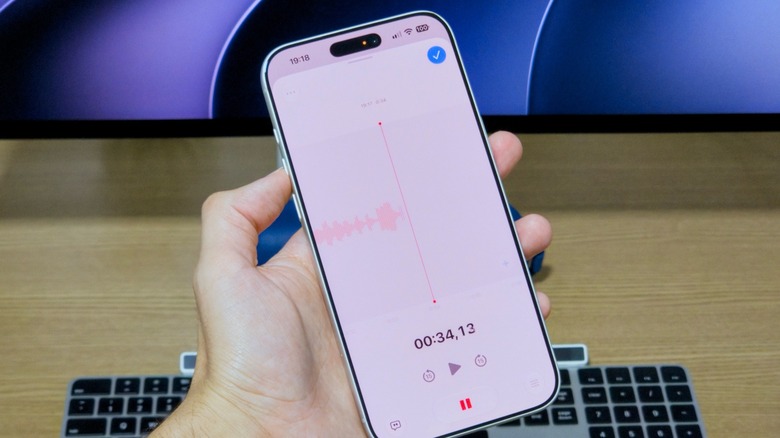
The app’s recording interface resembles a professional digital audio workstation. Tapping the primary red button starts a standard recording, while swiping up on the recording card opens a full-screen editing dashboard. There, users can pause and rewind or use punch-in recording to overwrite selected segments of an active recording, correcting mistakes or removing sudden background noises.
On the iPhone 16 Pro and newer models, a Plus button adds multitrack audio recording, allowing separate tracks to be layered within one session. The same recording view also supports the controls used to revise an active file.
Apple’s native, real-time transcription also challenges Google’s Pixel-exclusive Recorder app, which popularized on-device transcription in 2019. In Voice Memos, a speech bubble icon at the bottom-left of the screen produces a live, scrolling text transcript as speech is detected. Tapping a word in the transcript moves audio playback to that word’s timestamp.
A three-dot menu in the top-left corner provides a way to copy the full transcript to the clipboard for use in Apple Notes or Messages. It also contains a destructive Trim tool for cutting unwanted silence or chatter from the beginning or end of a file.
Playback adjustments appear under a three-slider icon at the bottom-right of the screen. With Mono and Stereo recordings, the controls include Skip Silence, which compresses dead air during playback, and Enhance Recording, which is designed to suppress ambient noise and room echo.
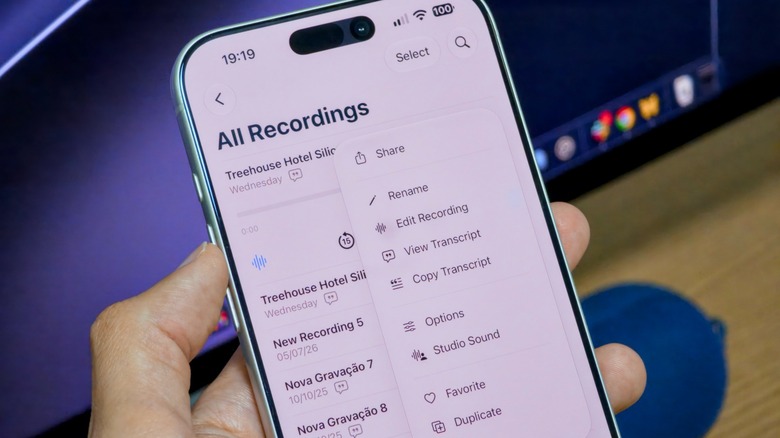
For Spatial recordings, the same option becomes Studio Sound. Machine learning algorithms isolate the speaker’s voice and simulate the acoustics of a soundproof recording booth. An adjustable intensity slider controls the level of processing.
Saved recordings are organized chronologically by default. When location services are enabled, Voice Memos automatically titles a file using the user’s current physical address, although files can also be renamed manually. Custom folders are available for categorizing recordings.
The integrated search bar indexes file names as well as the text in generated transcripts, so a user can locate a recording by searching for words spoken during the session. Apple’s cloud infrastructure handles the corresponding cross-device workflow.
At Settings > [User Name] > iCloud > Saved to iCloud, users can check whether Voice Memos is enabled for synchronization. Recordings and their corresponding transcripts can then be pushed to connected iPads, Macs, and Apple Watches.
Voice Memos’ expansion accompanies Apple’s broader integration of audio capture utilities across iOS. In iOS 18, Apple added call recording directly to the native Phone app, with built-in privacy protocols that verbally notify every participant when recording begins.
After the call ends, the system automatically generates a transcript and saves the file to the Notes app. Apple Intelligence can compile automated summaries there, replacing the historical workaround of using Voice Memos on a secondary device to record active phone conversations.