1Password Integrates with Anthropic’s Claude to Enable Secure AI Logins
Mac users can now allow Claude to log into web services securely using Touch ID verification.
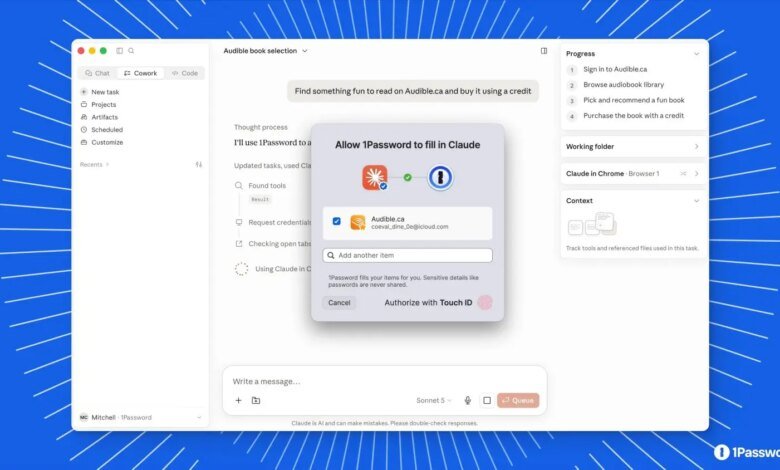
As artificial intelligence transitions from answering queries to actively executing tasks on the web, securing the credentials these digital assistants use has become a critical challenge. In a bid to address this vulnerability, 1Password has launched a new integration with Anthropic‘s Claude, allowing the AI chatbot to securely log into third-party services and perform automated actions on behalf of users.
The new feature is currently available to macOS users across 1Password’s Individual, Families, and Business subscription tiers. By bridging the gap between secure credential storage and autonomous AI capabilities, the integration aims to redefine how users interact with web services through automated workflows.
To address the obvious security concerns of granting an AI access to sensitive credentials, 1Password developed a dedicated framework. When Claude needs to log into a website, the credentials are transmitted through a secure channel. This architecture ensures that the AI model never actually sees, stores, or retains usernames, passwords, or two-factor authentication codes in its memory or context window.
While Claude manages the web navigation and page interactions, 1Password retains exclusive control over autofilling the login fields. To prevent unauthorized actions, the system mandates explicit biometric approval. Every time the AI attempts to access a stored account, the user must authorize the action using Touch ID on their Mac, ensuring that no automated login can occur without direct human consent.
This development comes amid the rapid evolution of agentic AI—systems capable of executing multi-step tasks across various applications. For example, a user could instruct Claude to log into an online bookstore, find a specific title, and complete the purchase. The AI would navigate the site and initiate the login, but the user would remain in control of the final authorization and payment approval.
To set up the integration, users must have both the desktop app and the corresponding browser extension installed for both 1Password and Claude. Once configured, the AI can call upon the password manager directly within the chat interface.
Recognizing the broader security risks associated with browser-based automation, 1Password has also introduced a proactive safety mechanism. The software will automatically lock its vaults if it detects that an unauthorized AI agent has taken control of the browser. This safeguard ensures that only the specific credentials explicitly approved for an active, user-sanctioned task are accessible, keeping the rest of the vault fully protected.
This integration represents a significant step in the evolution of password management, moving beyond passive storage toward secure, active integration with autonomous digital agents.