How to Set Up Sonos Speakers and Fix Common Connection Problems
Connect, troubleshoot, reset, and tune your Sonos system
SANTA BARBARA, Calif. — Sonos has spent several years navigating one of the most turbulent periods in its history, much of it involving the software used to control its premium home audio ecosystem. The Santa Barbara-based audio pioneer built its reputation on high-end, multi-room wireless synchronization before facing intense consumer backlash after a major app redesign in May 2024.
The redesign was intended to modernize the user interface ahead of the launch of the Sonos Ace headphones. It removed alarms, sleep timers, local music library access, and playlist editing, while also introducing severe connectivity bugs. CEO Patrick Spence issued a public apology in July 2024, scheduled hardware releases were temporarily delayed, and Sonos began a committed, months-long program of bi-weekly software updates to stabilize the platform and rebuild trust.


The standard “S2” app platform has largely recovered and now offers a more stable, responsive interface for integrating legacy and modern speakers. Modern Sonos devices operate on the company’s “S2” software platform, which is separate from the legacy “S1 Controller” app. The S1 app remains active only for older devices manufactured before 2015.
Most modern speakers, including the Era 100, Era 300, Move 2, and Arc Ultra, require the newer Sonos app. It is available through both the Apple App Store and Google Play Store. Users beginning a new installation must download the app and register a Sonos account.
The initial setup starts with the speaker connected to a power outlet. In the app, users building a configuration from scratch select “Start a new Sonos system,” then tap “Add your speaker.” The app combines Bluetooth Low Energy (BLE) with local network scanning to detect nearby Sonos hardware that has not yet been configured.
During the setup wizard, users enter their local Wi-Fi credentials and assign the speaker to a zone. The software provides 22 preset room names, ranging from “bathroom” to “TV room,” while custom names can be entered to match the home’s layout.
Both the mobile device running the app and the speaker must be connected to the exact same Wi-Fi network. Dual-band routers can complicate that requirement when they broadcast separate 2.4GHz and 5GHz networks under the same or different SSIDs. If a smartphone automatically connects to 5GHz while the speaker initializes on 2.4GHz, the app may fail to detect the hardware.
Guest networks create another obstacle because they typically use client isolation, a security feature that prevents connected devices from communicating with one another. A Sonos speaker will not function properly if the controller device or the speaker is placed on a guest network. A Virtual Private Network (VPN) on a mobile device can also mask the local IP address space and prevent the app from communicating with local network hardware, so disabling an active VPN during setup is a standard troubleshooting step.
On iOS and iPadOS, Apple requires explicit permission for the Sonos app to access the “Local Network” in the device’s privacy settings. If that permission was denied during the initial installation, the app can return a persistent “No products found” error.
After one speaker is installed, additional hardware can be added by opening the settings menu and selecting “Add Speaker or Component.” The system then scans for new units. Dedicated home theater configurations have stricter physical requirements: stereo pairs and rear surround channels require matching speaker models. Two Era 100 speakers can serve as left and right surrounds, but an Era 100 cannot be paired with an Era 300 for that purpose.
Smart home features are also configured in the app. Under settings, users can scroll to “Add a Voice Assistant” to connect platforms such as Amazon Alexa or the offline-capable Sonos Voice Control.
When ordinary connection attempts fail, the recommended hardware recovery process begins with a soft reboot. Unplug the speaker’s power cable from the back of the unit or from the wall outlet, wait at least 10 seconds for the internal capacitors to discharge fully, and reconnect it. The speaker should then be given approximately one minute to complete its boot cycle and return its status light to a solid state.
A factory reset is the last resort because it erases stored calibration profiles, Wi-Fi credentials, and system configurations. On modern speakers such as the Era series or Move 2, unplug the power cord, press and hold the Bluetooth button on the back of the device while reconnecting the power cable, and continue holding it until the front status indicator flashes orange and white. When the light changes to flashing green, the reset is complete and the speaker can be added to the system again.
For legacy speakers, the reset process remains identical, but users must hold the physical “Join” button, identifiable by an infinity-loop icon, or the Mute button during the power-on sequence.
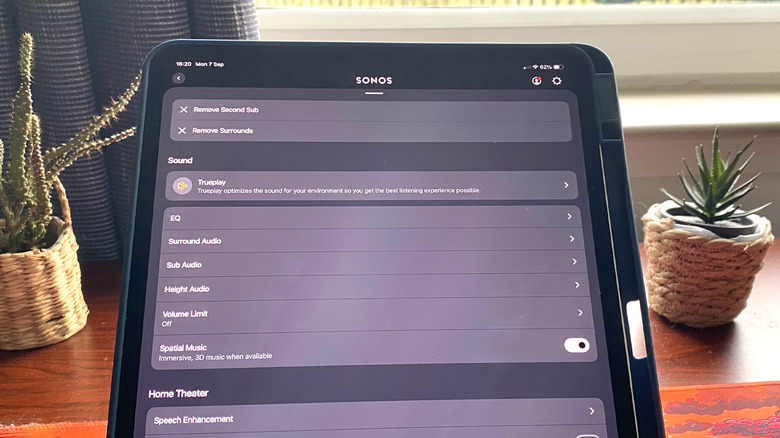
Once the digital and physical connections are stable, Sonos’ built-in digital signal processing (DSP) tools can be used to adjust acoustic output. The primary physical room-calibration option is Sonos’ proprietary Trueplay tuning technology.
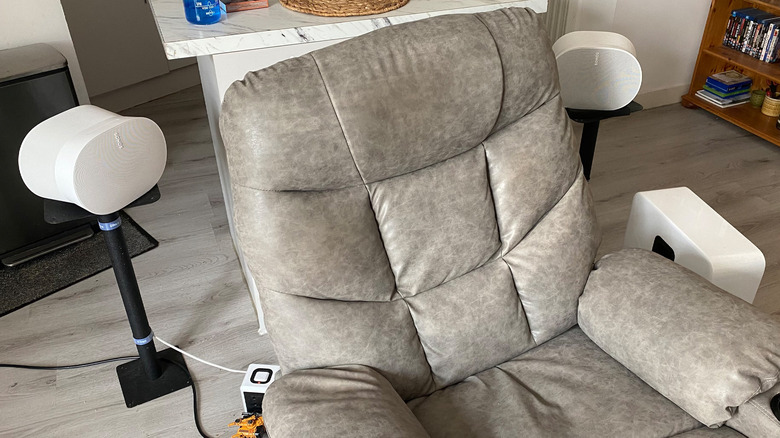
Objects, wall materials, and furniture placement affect how sound waves move through a room. Trueplay uses the microphone array of a mobile device to analyze reflections from test tones. During a session, the speaker emits sweeping frequencies while the user slowly moves the mobile device throughout the primary listening area. The software calculates the room’s acoustic profile and applies customized equalization curves to neutralize harsh reflections or muddy bass.
Full Trueplay tuning was limited for years to iOS devices because iPhones provide predictable, standardized microphone hardware. Android users can use the simplified “Quick Tuning” feature on newer portable models such as the Move 2 or Roam, which uses the speaker’s internal microphones to self-calibrate. Full environmental scanning still yields the most precise results.
Manual equalization is available at Settings > Your System > [Selected Speaker] > Sound > EQ. Bass and treble can each be adjusted on a scale from -15 to +15. Systems with a dedicated Sonos Sub or Sub Mini also require attention to crossover frequencies and output levels; setting the subwoofer output too high, such as above +5, can overwhelm mid-range clarity and cause structural vibrations.
For home theater systems using soundbars such as the Arc, Arc Ultra, or Beam, the app provides dedicated audio enhancement modes. “Speech Enhancement” uses DSP to boost frequencies associated with human vocals in the center channel so dialogue is not lost beneath action sound effects.
“Night Sound” works as a dynamic range compressor. It reduces the volume of sudden loud effects such as explosions while raising the level of quiet sounds, making it easier to watch content at lower volumes without disturbing others.