

Gemini Can Clean Up Google Drive—But Only Under These Limits
Google’s Gemini file tool recommends moves but leaves users in control

Google Drive’s new automated organization feature is available globally to Google Workspace subscribers after testing began in late 2023. Powered by the Gemini artificial intelligence model, it generates recommendations for restructuring loose documents and folder hierarchies in cloud storage repositories.
The tool appears in the Google Drive interface as “Suggest file moves” or “Organize My Files.” It is part of Alphabet Inc.’s Google initiative to monetize generative AI capabilities across its productivity software portfolio. Access is limited to paying tiers, including enterprise Google Workspace customers on Business, Enterprise, and Education plans, along with individual consumers subscribed to the Google One AI Premium plan.


Google One AI Premium costs $19.99 per month and includes extra storage capacity along with YouTube Premium Lite benefits. Free Google Drive accounts offer 15 gigabytes of standard storage but do not have access to the AI organization interface.
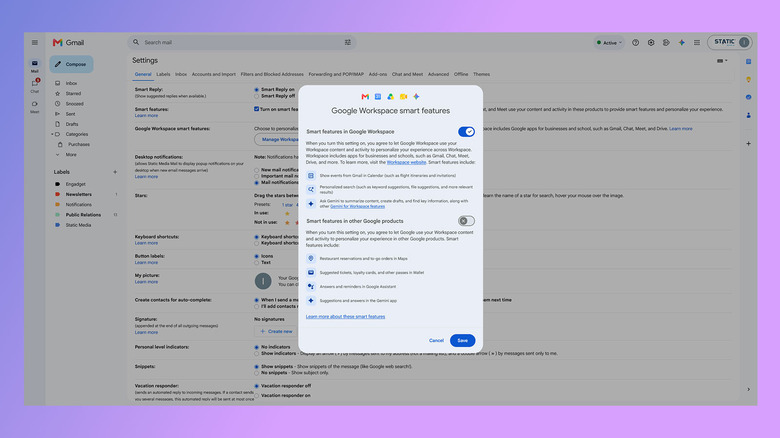
Before using the feature, eligible accounts must have Google Workspace smart features enabled in their account settings. Users can verify or activate the setting by opening Gmail, selecting the settings menu, choosing “See all settings,” and opening “Manage Workspace smart feature settings” under the General tab. The requirement connects the tool to Google’s underlying data processing architecture, which also governs automated capabilities such as Smart Compose and email categorization across Gmail and Google Docs.
The Gemini file organization system evaluates existing folder structures, file titles, and metadata. It can recommend moving loose files into appropriate destination directories or newly generated folders, but it does not scan or process the full textual contents of stored documents to determine where they should go. Files using generic defaults, including “Untitled document,” therefore cannot be categorized by the algorithm.
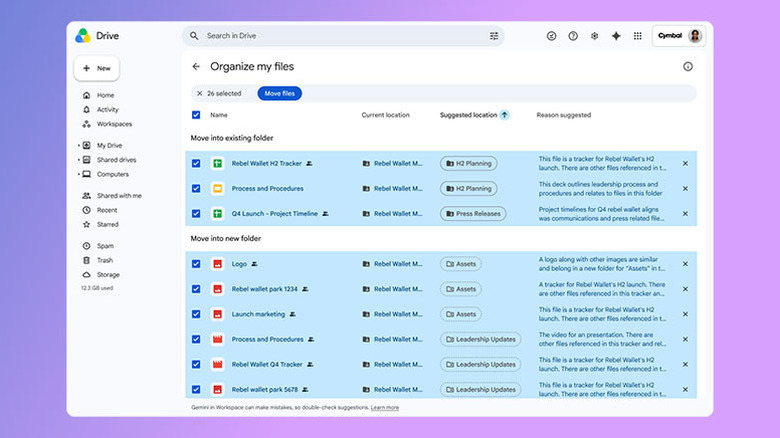
The system also cannot rename files or automatically execute file transfers without explicit user intervention. From the “My Drive” section on the web, a user selects “Suggest file moves” and receives a secondary window containing proposed file relocations. Interactive cards allow each document to be previewed by hovering over its entry, while corresponding checkboxes require users to manually approve suggested relocations before directory modifications occur.
Google has limited the tool to private files and folders owned by the individual user account. It is blocked from interacting with shared files, collaborative directories, and organizational Shared Drives. Enterprise policies also prevent corporate Workspace accounts from processing personal files stored outside the organizational tenant.
The deployment follows Google Drive’s evolution as a cloud storage platform. Drive launched in April 2012 as a successor to Google Docs and surpassed 1 billion active users by 2018, becoming the central document repository for consumer and business accounts. Google rebranded its office productivity suite from G Suite to Google Workspace in October 2020, then changed the name of its underlying AI assistant technology from Bard to Gemini in February 2024.










One Comment