Apple’s Safari Pitch to Chrome Users: 5 Extra Hours Battery, But Extensions Stay Behind
The campaign's benchmarks are real but narrow — your workflow decides whether switching pays off
Apple wants Mac users to abandon Chrome. The company’s new “Stay on Safari” campaign argues that its browser delivers up to five additional hours of video streaming on a single charge and loads frequently visited sites 35% faster — figures derived from Apple’s own testing on 15-inch MacBook Airs with M5 chips and 16GB of memory. The pitch leans on Apple’s unique advantage: total control over WebKit, the engine powering Safari, and the silicon it runs on.
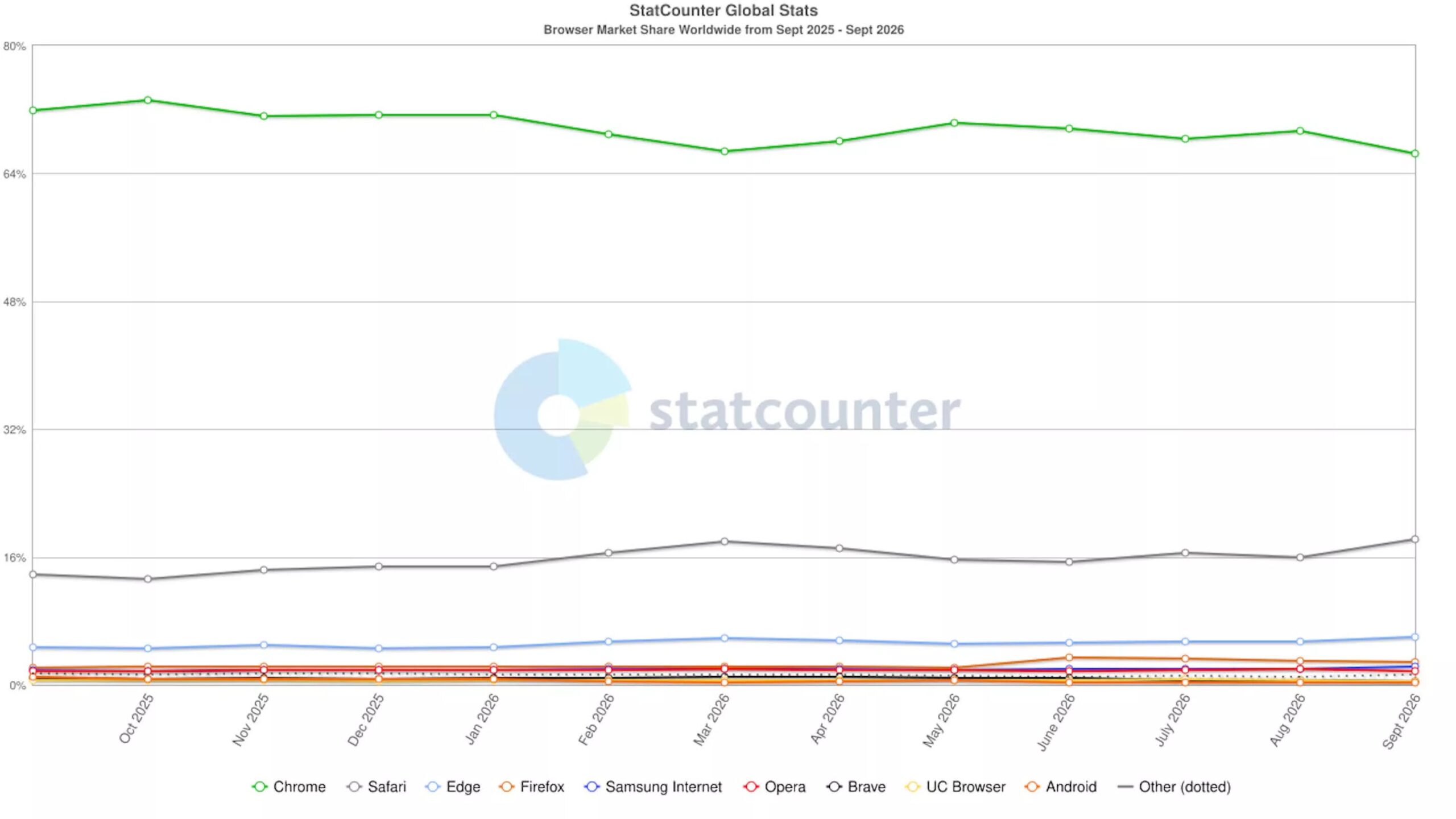
Chrome still commands 66% of the global browser market, according to StatCounter, with Safari at roughly 18%. Apple’s campaign marks its most direct consumer-facing challenge to that dominance in years, framing efficiency and privacy as reasons to switch. But the benchmarks come with caveats that matter for everyday use.
The 35% speed claim measures page loads on 12 popular sites under simulated network conditions. It does not reflect performance across the open web, on older Macs, or on heavier web applications. The battery figure applies specifically to video streaming — not general browsing, not video calls, not running web-based development tools. Streaming video and loading pages stress different system resources, and Apple’s campaign treats them as separate claims.


Under the hood, the architectural gap is real. Safari’s WebKit engine is built exclusively for Apple hardware, allowing tight integration with the company’s unified memory architecture and media engines. Chrome’s Chromium foundation uses a multi-process model that isolates tabs for stability and security — a design that historically consumes more RAM. On Apple silicon, that difference can show up in Activity Monitor, though Apple’s published numbers remain unverified by independent labs.
Privacy is the other pillar. Safari blocks third-party cookies by default and deploys Intelligent Tracking Prevention, which limits cross-site tracking without user configuration. Chrome has moved more slowly; Google’s Privacy Sandbox initiative aims to replace third-party cookies with new APIs, but rollout has been delayed repeatedly amid regulatory scrutiny and industry pushback. For users who never touch settings, Safari today offers stronger baseline protections.
What the campaign doesn’t emphasize: switching costs. Chrome’s extension ecosystem remains unmatched, particularly for developers, researchers, and power users who rely on tools that have no Safari equivalent. Cross-platform sync — passwords, history, tabs, extensions — works seamlessly across Windows, Android, and Linux. Safari syncs only within Apple’s ecosystem. Enterprise environments almost universally standardize on Chrome for management policies, legacy web app compatibility, and Google Workspace integration.
Google’s recent missteps have handed Apple ammunition. Chrome’s automatic download of the 4GB Gemini Nano model for on-device AI features drew criticism for consuming disk space and bandwidth without clear user consent. Manifest V3, the extension platform overhaul that restricts ad-blocking capabilities, has frustrated power users. Both issues feed a narrative that Chrome prioritizes Google’s interests over user control.
Apple has also quietly improved Safari’s feature parity. Reader Mode now handles paywalled articles more reliably. Profiles separate work and personal browsing without separate user accounts. Apple Pay integration remains frictionless on supported sites. Tab Groups, shared tab groups, and vertical tabs on iPadOS narrow the usability gap.
The decision ultimately depends on workflow. A user who lives in Google Docs, manages passwords in Bitwarden, and switches between a MacBook and a Pixel phone loses more than they gain. Someone who streams video on battery, values default privacy, and stays within Apple’s ecosystem may see tangible benefits. Apple’s claims are specific enough to test — and specific enough to dismiss if your browsing doesn’t match the test conditions.
As of this month, Chrome 128 continues rolling out with incremental performance improvements and expanded Privacy Sandbox APIs, while Safari 18 ships with macOS Sequoia this fall, bringing AI-powered Highlights and a redesigned Reader. The competition is moving — but the switching calculus hasn’t fundamentally changed.