Optimizing AMD Software Adrenalin: Essential Settings for Peak Gaming Performance
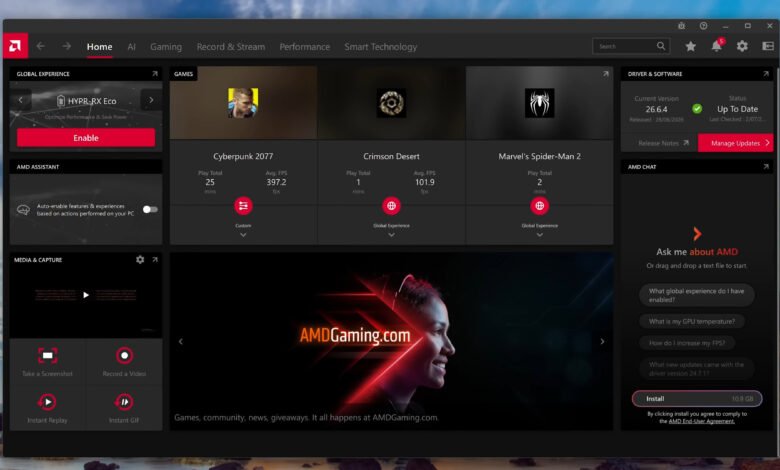
Configuring AMD Software: Adrenalin Edition requires balancing advanced driver features against legacy performance toggles. While the application provides a comprehensive control panel for Radeon graphics cards, optimizing a gaming PC for maximum frame rates and visual clarity depends on selecting individual settings—such as driver-level FSR 4 upscaling upgrades and correct color formats—while bypassing broad preset profiles like Hypr-RX that can harm image quality or introduce input latency.
Optimal display setup begins in Windows Settings, where users must manually select the highest supported refresh rate before adjusting driver parameters. Within the AMD Adrenalin display menu, variable refresh rate functionality must be enabled under labels such as AMD FreeSync, Adaptive Sync Compatible, or VRR. To achieve accurate color rendering, the display should be configured to RGB 4:4:4 Pixel Format PC Standard (Full RGB). This prevents chroma subsampling, a compression technique that reduces color resolution to conserve display interface bandwidth over HDMI or DisplayPort connections, which often causes text color bleeding and blurred visual details on desktop monitors. If bandwidth constraints prevent 10-bit color at full RGB 4:4:4, dropping the color depth to 8-bit preserves full pixel accuracy without severe color loss.
For modern graphics hardware built on RDNA 3 and RDNA 4 architectures, AMD Software can automatically upgrade supported in-game FSR 3.1 implementations to FSR 4 upscaling. This upgrade shifts upscaling from conventional temporal algorithms to machine learning-assisted reconstruction, noticeably improving fine detail and motion stability. On RDNA 4 GPUs, a separate driver toggle enables an AI-driven upgrade for FSR Frame Generation. Players can verify whether driver upscaling is working by launching the in-game overlay with Alt + R, where an Active status indicator confirms that the driver-level enhancement is operating during gameplay.
Conversely, broad optimization presets like Hypr-RX often detract from the gaming experience. Hypr-RX simultaneously turns on features including Radeon Super Resolution—a spatial upscaler based on legacy first-generation FSR technology—and driver-level frame generation via AMD Fluid Motion Frames. Because spatial upscaling yields lower image quality than modern temporal or AI-based upscalers, and driver-based frame generation lacks game-engine vector integration, both functions are best kept disabled. Keeping software up to date is equally straightforward, as drivers can be managed via official AMD Software drivers tools or through the integrated Install Manager.
Select graphics options still offer tangible benefits under specific conditions. Radeon Anti-Lag can reduce input latency when a system is GPU-bound, though it should be tested on a per-game basis as it may elevate latency in CPU-bound titles. For precise frame rate capping, Radeon Chill functions as a built-in limiter when both its minimum and maximum frame rate sliders are assigned the same numerical value. In soft-looking titles, Image Sharpening 2 applies a clean sharpening filter without requiring global activation.
System monitoring and media capture are fully integrated into the driver suite. The compact metrics overlay, activated using Ctrl + Shift + O, displays real-time frame rates, GPU utilization, and system temperatures during gameplay, with a Game Detection for Metrics Overlay feature that automatically hides the display when returning to the desktop. For content creators, Adrenalin supports local recording up to 4K resolution at 60 FPS or 120 FPS with bitrates reaching 100 Mbps. Supported Radeon hardware offers hardware-accelerated AV1 encoding, which delivers superior visual compression over older formats like H.264 and HEVC, though traditional H.264 remains available for faster editing software compatibility.