What Is MCP? Key Terms Explained
Key Takeaways
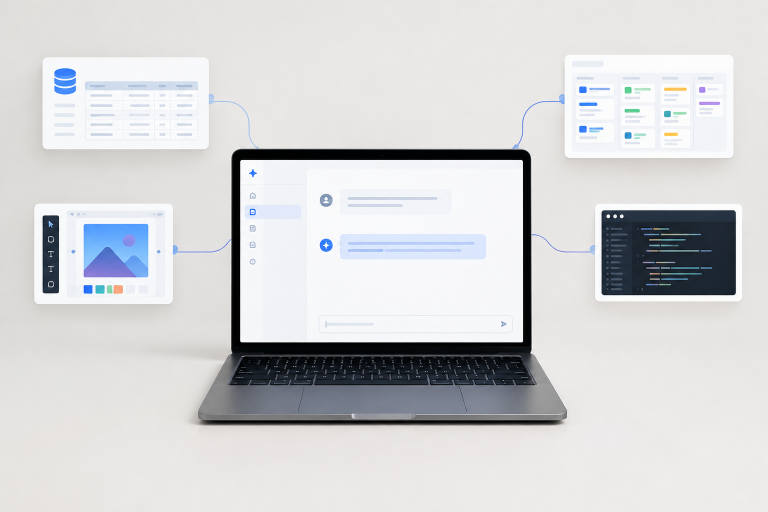
- MCP (Model Context Protocol) helps AI applications connect with external tools, data sources, and business systems.
- Hosts, clients, and servers work together to enable communication between AI applications and connected services.
- MCP supports workflows such as design research, software development, testing, and project management.
- MCP can work alongside APIs and RAG to retrieve information and support actions.
- Security depends on trusted connections, limited permissions, and appropriate human oversight.
- Start with one practical task and expand connections only when they provide clear value.
AI becomes more useful when it can work with approved information beyond a chat window, including files, databases, design libraries, project boards, and testing tools. For teams exploringwhat is MCP in AI, Mobbin offers a helpful glossary for understanding how AI applications can connect with external context. As a product design research platform featuring real app screens and user flows, Mobbin is a relevant resource for teams looking to study established interface patterns and make more informed design decisions.
Imagine asking an AI assistant to find dashboard examples, check project requirements, compare a component against a design system, or run an approved browser test. Connected workflows can make these tasks more efficient by reducing manual copying and switching between applications. Understanding how these connections work, including their permissions and security requirements, helps teams use AI more effectively while keeping people in control.
What Is MCP in Simple Terms?
So, what is MCP? MCP stands for Model Context Protocol. It is an open standard that provides AI applications with a shared way to connect to external tools and data sources. Think of it as a common connector: instead of building a separate custom integration for every AI app and every service, compatible systems can use a common format to communicate.


The goal is not to replace the systems a business already uses. An MCP server can sit between an AI application and an existing service, making selected capabilities easier for the AI to discover and use. Anthropic’s original explanation of theModel Context Protocol describes the standard as a way to connect AI-powered tools with data sources, business tools, and development environments.
The Main Parts of an MCP Setup
Host
The host is the main AI application where a person works. It might be an AI assistant, a coding environment, or another application that can coordinate agent-style tasks.
Client
The client is the part of the host that communicates with an MCP server. A single host may use multiple clients or connect to multiple servers when a workflow needs more than one source of context.
Server
An MCP server exposes useful capabilities in a format the AI application can understand. It may connect to a design library, repository, file system, database, or business application.
Tools, Resources, and Prompts
A tool performs an action or makes a request, such as searching records, creating a ticket, or running a test. A resource is information that the AI can read, such as a document, a screen, a database record, or a project detail. A prompt is reusable guidance for completing a task. In short, prompts guide the work, while tools retrieve information or perform actions.
How an MCP Request Works
- A user asks an AI tool to find examples of a design pattern.
- The AI client identifies a connected server that can help.
- The server searches its allowed data or service.
- The result returns to the AI conversation.
- The AI summarizes the findings or uses them in the next task step.
This flow can reduce manual switching, copying, and pasting between applications. It still depends on clear instructions, reliable source material, and permissions appropriate to the task. An AI should not receive broader access simply because a connection is technically possible.
Where MCP Fits Into Design Research
Design research often involves identifying relevant examples as a team actively solves a product problem. A connected workflow can help designers review login screens, onboarding flows, dashboards, empty states, settings pages, or paywalls without having to recall every reference. The value is not automatic design quality. It is faster access to relevant examples that a designer can evaluate in context.
For example, a team could ask an AI assistant to retrieve established patterns for account setup or subscription choices, then compare those references with its own product goals. This approach is most useful when the connected source is relevant, the search request is specific, and people retain responsibility for the final design decision.
MCP Compared With APIs, Plugins, and RAG
MCP vs. an API
An API exposes functions or data for software to use. MCP gives AI applications a shared method for discovering and using available capabilities. In many cases, an MCP server works with an existing API rather than replacing it.
MCP vs. Plugins
Plugins have often been tied to one product or platform. MCP is intended to provide a common connection model that compatible AI tools and services can adopt, reducing the need for platform-specific integrations.
MCP vs. RAG
Retrieval-augmented generation, often called RAG, usually retrieves information from a prepared collection of documents or knowledge. MCP can connect an AI application to live systems and approved actions. A practical workflow may use both: RAG for a curated knowledge base and MCP for current project data or tool calls.
Common MCP Use Cases in 2026
- Design research: Finding real interface examples and user-flow patterns during product work.
- Software development: Searching repositories, issues, and technical documentation.
- Testing: Interacting with a browser or test environment through controlled tools.
- Business data: Querying approved records, analytics, and internal documents.
- Project management: Checking task status, creating tickets, and summarizing updates.
- Customer support: Retrieving permitted account details and preparing response drafts.
The latestMCP specification update reflects how the protocol continues to evolve around areas such as transport, authorization, extensions, and developer tooling. Teams should confirm that their chosen host, client, and server support the features they plan to use.
When MCP Helps and When It Does Not
Good Reasons to Use MCP
- The task needs live information from another approved system.
- People repeatedly paste the same context into AI conversations.
- The workflow requires searching, comparing, retrieving, or acting across tools.
- A team wants fewer one-off integrations between AI applications and services.
When a Regular Prompt Is Enough
- The request is a simple rewrite, brainstorm, or explanation.
- The only needed context is already attached to the conversation.
- No live information or outside action is required.
- Setting up the connection would add more effort than it would provide practical value.
Security and Permission Questions to Ask
MCP is a connection standard, not a guarantee that every server or workflow is safe. Risk depends on the server, its authentication method, the data it can access, its available actions, and the approval controls around those actions.
- What data can the server read?
- Can it write, delete, publish, or make payments?
- Can access be limited to one project, account, or environment?
- Are tool calls logged and reviewable?
- Do people approve high-risk or irreversible actions?
- How are credentials stored, scoped, and renewed?
A Simple Checklist for Evaluating an MCP Connection
- Define the exact task the connection should support.
- List only the data and actions the AI truly needs.
- Use the smallest practical permission scope.
- Choose servers from trusted sources and review their capabilities.
- Start with read-only access before allowing write actions.
- Keep tool names and descriptions clear enough to support safe use.
- Require human review for irreversible actions.
- Monitor errors, unexpected calls, and unusual behavior.
Common Questions About MCP
What does MCP stand for?
MCP stands for Model Context Protocol. It provides a shared way for AI applications to connect with external tools and data.
What is an MCP server?
An MCP server exposes a service’s selected data, resources, or actions for a compatible AI application to use.
Is MCP the same as an AI model?
No. MCP is not a model. It is a connection standard that enables an AI application to work with external systems.
Can MCP replace APIs?
Usually, no. MCP commonly works alongside APIs and can provide a consistent layer that helps AI applications discover available capabilities.
Conclusion: The Practical Meaning of MCP
At its core, what is MCP comes down to a shared connection layer between AI applications and outside systems. Its practical value comes from useful context, reliable data, carefully scoped permissions, and workflows that people can understand and oversee. Start with one repeatable task, connect only the tools that task requires, and review every permission before expanding the workflow.