Scareware Costing Consumers Millions as Ad Networks Fuel the Crisis
Malvertising campaigns exploiting legitimate ad networks drove 2.8 million CypherLoc infections this year.

The digital advertising ecosystem has become the primary delivery mechanism for one of 2026’s most profitable cybercrime operations, turning legitimate ad spaces into launchpads for fake security alerts that drain consumer bank accounts.
A strain of browser-based scareware known as CypherLoc has targeted more than 2.8 million people since the start of 2026, according to a study from security firm Barracuda. The attacks rely heavily on malvertising—cybercriminals purchasing standard advertising inventory on legitimate websites and swapping in malicious code that redirects visitors to fraudulent warning pages.
This infrastructure dependency shifts significant liability toward the ad networks and publishers hosting these compromised banners. When users click what appears to be a standard advertisement, they are forced into full-screen mode with their mouse cursors hidden, presented with fabricated “Critical Threat Detected!” warnings designed to mimic Windows Defender or McAfee Security Software interfaces.


The financial mechanics driving the surge are straightforward. Attackers monetize through three channels: charging victims for bogus anti-malware scanners that are themselves malicious, extracting payment information directly, or routing panicked users to call centers staffed by scammers posing as tech support agents. One variant flagged by the FTC weaponizes fake CAPTCHA requests to trick users into installing malware under the guise of verifying human traffic.
Browser notification permissions have opened a secondary revenue stream. Sites prompt visitors to click “Allow” under false pretenses, such as claiming it is required to read an article. Once granted, the domain pushes alerts directly through the Windows notification center even when the browser is closed. These smaller corner pop-ups bypass traditional ad blockers entirely because the operating system treats them as authorized communications.
Stopping the bleeding requires circumventing the hijacked browser interface. Clicking anywhere on a scareware screen typically triggers the payload. Chrome, Edge, and Firefox users can terminate the offending tab via the built-in task manager using Shift + Escape, locating processes labeled with outlandish titles like “Security Alert!” and selecting End Task. Pressing F11 exits full-screen mode if the page locks the display.
If the browser freezes completely, Ctrl + Shift + Esc opens the system-level Task Manager. Sorting by Name places active applications at the top for immediate termination. Users who configure their browsers to restore previous sessions upon reopening must decline that prompt, or the scam page will reload instantly.
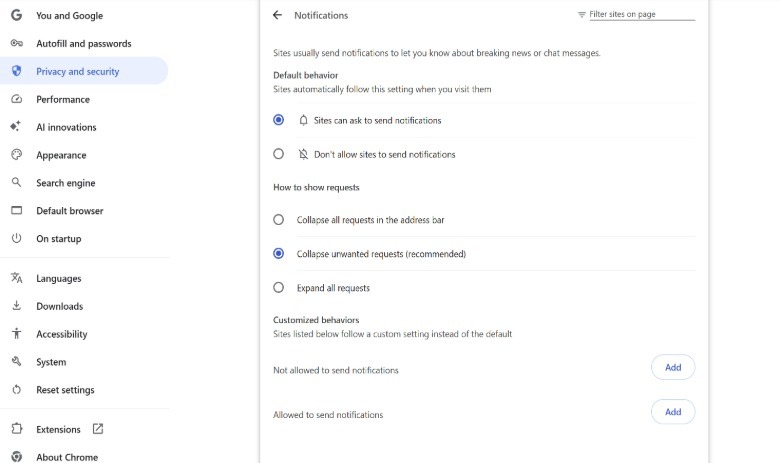
Persistent notifications require purging site data using Ctrl + Shift + Del on Chrome and Edge. In Chrome, navigating to Settings > Privacy and security > Site settings > Notifications exposes the list of domains approved to send pings. Unknown entries should be removed or blocked via the three-dot menu beside each URL.
Rogue browser extensions frequently serve as the underlying persistence mechanism. The extension management panel, accessible via the puzzle piece icon in the upper right corner, allows users to audit and uninstall unrecognized add-ons. At the operating system level, pressing Win + I and checking Apps > Installed apps reveals junk software that may have been bundled during previous downloads.
Actual malware infections rarely announce themselves with flashing lights or robotic voices reading IP addresses aloud. Silent data exfiltration operates without visual indicators. Microsoft Defender provides baseline protection included with Windows. Malwarebytes offers a free on-demand scanner for secondary verification, alongside a Browser Guard extension that intercepts malicious pop-ups and general trackers before they render.