How to Run Samsung Galaxy Phone Diagnostics and Check Up to 22 Components
Built-in checks cover the battery, display, cameras, connectivity and more, but do not measure phone speed.
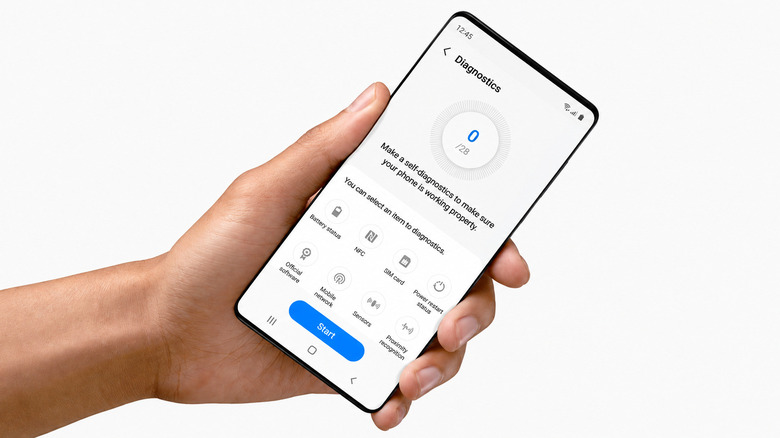
Samsung Galaxy phones running Android 12 or newer have built-in diagnostics that can help users check for hardware faults before paying for third-party repairs or buying replacement hardware. On modern flagship models, the tools can run up to 22 component checks, covering problems such as rapid battery depletion, dropped calls, faulty sensors and degraded touchscreen response.
There are two ways to open the suite. In Settings, select Device care, tap Diagnostics, then choose Phone diagnostics. Alternatively, open the Samsung Members app, select the Support tab at the bottom of the interface and tap Diagnostics. Users can check components individually or select Test all to run every supported test in one session.
The controls are available on Galaxy devices running Android 12 with One UI 4.0 or later. Menu layouts and the exact number of tests vary by phone model, onboard sensors and installed software version. The diagnostics are integrated into Samsung’s One UI software through Device care and Samsung Members.

Checks cover touchscreen grid responsiveness, multi-touch register points and display pixel integrity. Audio tests assess the main loudspeaker, dedicated in-call earpiece and multiple built-in microphone arrays. The suite also tests front-facing and rear camera modules, optical zoom capabilities, flash functionality and autofocus mechanisms.
Some checks run automatically; others need input from the user. A proximity sensor test, for example, requires a palm over the upper display bezel. A speaker test plays generated tone frequencies and asks the user to confirm the output. When a component fails, the software provides troubleshooting recommendations or links to relevant Samsung support guides.
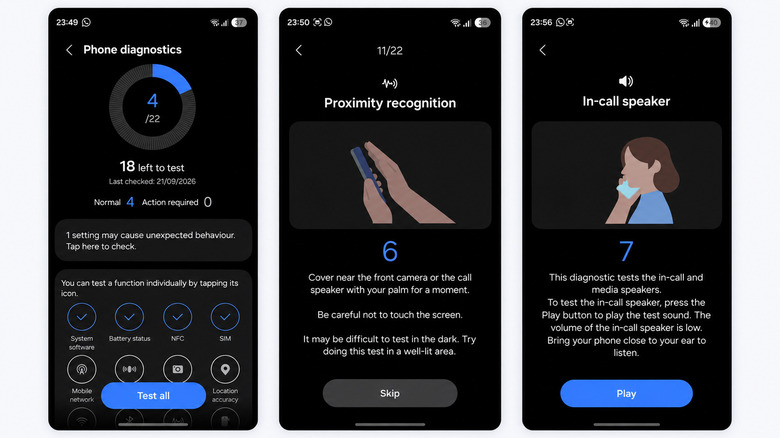
The sensor checks include the proximity and ambient light sensors, accelerometer, gyroscope and magnetometer. Biometric tests cover optical or ultrasonic fingerprint readers and facial recognition assemblies. For connectivity, the suite checks Wi-Fi circuitry, cellular modem registration, Bluetooth radios, Near Field Communication (NFC) chips, SIM card tray detection, eSIM modules and USB-C physical connections.
Power-related tests assess wired charging circuit integrity, wireless charging coils and battery management ICs. On supported Note, Ultra and Z Fold series devices, model-specific checks also cover S Pen digitizers, stylus button inputs and hover recognition.
Older or heavily used phones have a dedicated battery status evaluation based on internal charge capacity monitoring and cycle counts. Samsung reports three classifications. Normal means the lithium-ion cell operates within standard voltage parameters and retains sufficient maximum capacity relative to its design specification. Weak indicates reduced energy density and efficiency from long-term charge-discharge cycles, age or thermal exposure, with noticeably shorter battery life between charges. Bad signals significant chemical degradation that can cause unstable power delivery, potential thermal throttling or sudden shutdowns; Samsung recommends official battery replacement at that status.
Lithium-ion batteries typically lose capacity gradually after 500 to 800 full charge cycles, at which point overall capacity drops below 80 percent of the original design specification. A device that consistently fails diagnostic tests, or reports a Bad battery condition, needs hardware repair or component replacement.
Passing every check does not, however, guarantee a fast or lag-free phone. Device care diagnostics assess whether components function, not processing capability or network throughput. Less than 10 percent available storage can impair the temporary swap files and caching Android needs; performance across universal flash storage (UFS) drives can deteriorate, causing app crashes and interface stutter. Outdated software, corrupted system cache partitions and excessive background app activity can also strain system RAM and delay the interface despite functioning hardware.
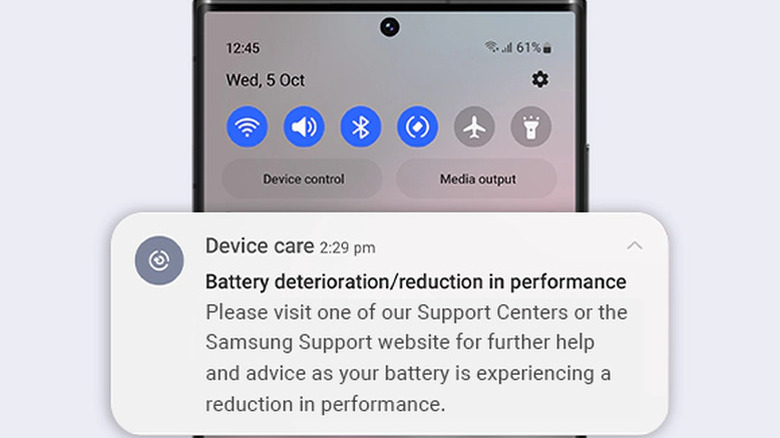
The hardware tests do not measure raw CPU or GPU throughput. Benchmark suites such as Geekbench measure processor compute speeds, which remain fixed by hardware architecture regardless of device age. A mid-range Galaxy A-series device and a high-end Ultra model therefore have different performance baselines even if both register 100 percent hardware health. Likewise, Wi-Fi and mobile network checks establish whether internal antenna radios work, not actual data transfer speeds, latency or bandwidth congestion; dedicated network speed tools measure external network conditions and router distance.
For a phone going in for physical repair, devices running One UI 5.0 (Android 13) or later include Maintenance Mode under Settings > Device care > Maintenance mode. It creates an isolated user profile that restricts access to personal photos, messages, call logs, contacts and installed apps, while keeping core system diagnostics available to service technicians without a full factory data reset.