RemoveMacAI Tool Deletes Apple Intelligence, Frees 12GB on Mac
Tool disables all AI features except dictation; reversible via Terminal

A new open-source utility gives Mac users a way to completely purge Apple Intelligence from their systems, recovering roughly 12 gigabytes of storage in the process. The tool, called RemoveMacAI, arrives as Apple’s on-device AI suite faces criticism for lagging behind rivals like ChatGPT and Claude while consuming significant disk space on Apple Silicon Macs. Unlike the per-feature toggles Apple provides, RemoveMacAI uses a configuration profile to disable the entire subsystem at once, stripping out the underlying machine-learning models that remain on disk even after individual features are turned off.
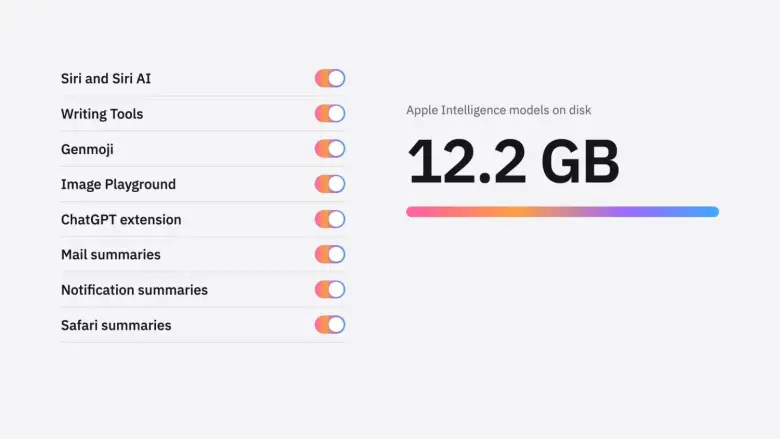
The utility leverages macOS’s restriction keys for Apple Intelligence and forces additional settings that lack dedicated keys. It deletes the models through the system’s resource-management service without disabling System Integrity Protection or modifying protected files — a cleaner approach than some earlier workarounds. To prevent the operating system from automatically re-downloading the models, the profile redirects download requests to a closed local port. The developer says the profile persists across system updates, so users won’t need to reapply it after each macOS upgrade.


Removing Apple Intelligence disables nearly every AI-driven feature on the Mac: Siri, Writing Tools, Genmoji, Image Playground, Mail summaries and smart replies, ChatGPT integration, Xcode predictive code completion, and Photos Clean Up. The sole exception is dictation, which relies on separate voice models that stay on the device.
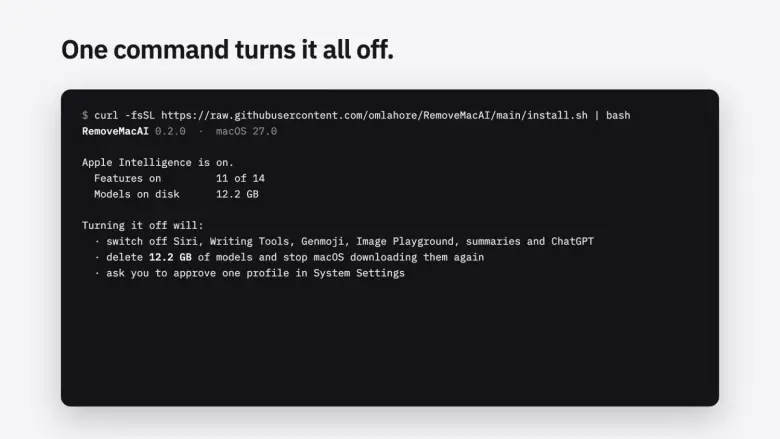
RemoveMacAI runs only on Apple Silicon Macs running macOS 27, the upcoming release that removes the built-in Apple Intelligence toggle. Installation is a single Terminal command that downloads and executes the latest version from a temporary directory — no permanent installation required. The script then prompts for confirmation, opens System Settings to approve the configuration profile, and begins removing the models. Storage may not be reflected immediately because the system deletes files asynchronously.

Users can restore Apple Intelligence at any time by running `removemacai revert` in Terminal, after which macOS will re-download models as needed. For users on base-model Macs with 256GB or 512GB SSDs, the 12GB footprint represents a meaningful chunk of available space, and RemoveMacAI offers a one-click solution for those who prefer to wait for a more mature release or simply don’t use the features.