ClickFix Turns Fake CAPTCHAs Into Corporate Network Entry Points
Fake CAPTCHA prompts are turning native Windows and macOS command tools into malware launchers
WASHINGTON — Fraudulent CAPTCHA windows, fake browser error dialogs, and cloud service failure notifications are appearing on legitimate or compromised websites as part of a social engineering vector known as “ClickFix.” The tactic is rapidly emerging as a primary initial access threat for corporate networks, prompting cybersecurity researchers to urge enterprise administrators to harden operating system controls.
ClickFix overlays have been found on legitimate WordPress websites, public Google Sheets documents containing embedded web links, and decentralized application (dApp) interfaces hosted on Web3 smart contract platforms. Financially motivated cybercrime syndicates have integrated the technique into widespread malware distribution networks, while Russian state-sponsored Advanced Persistent Threat (APT) groups—including threat clusters associated with military intelligence and targeted espionage operations—have added ClickFix mechanisms to their operational playbooks.
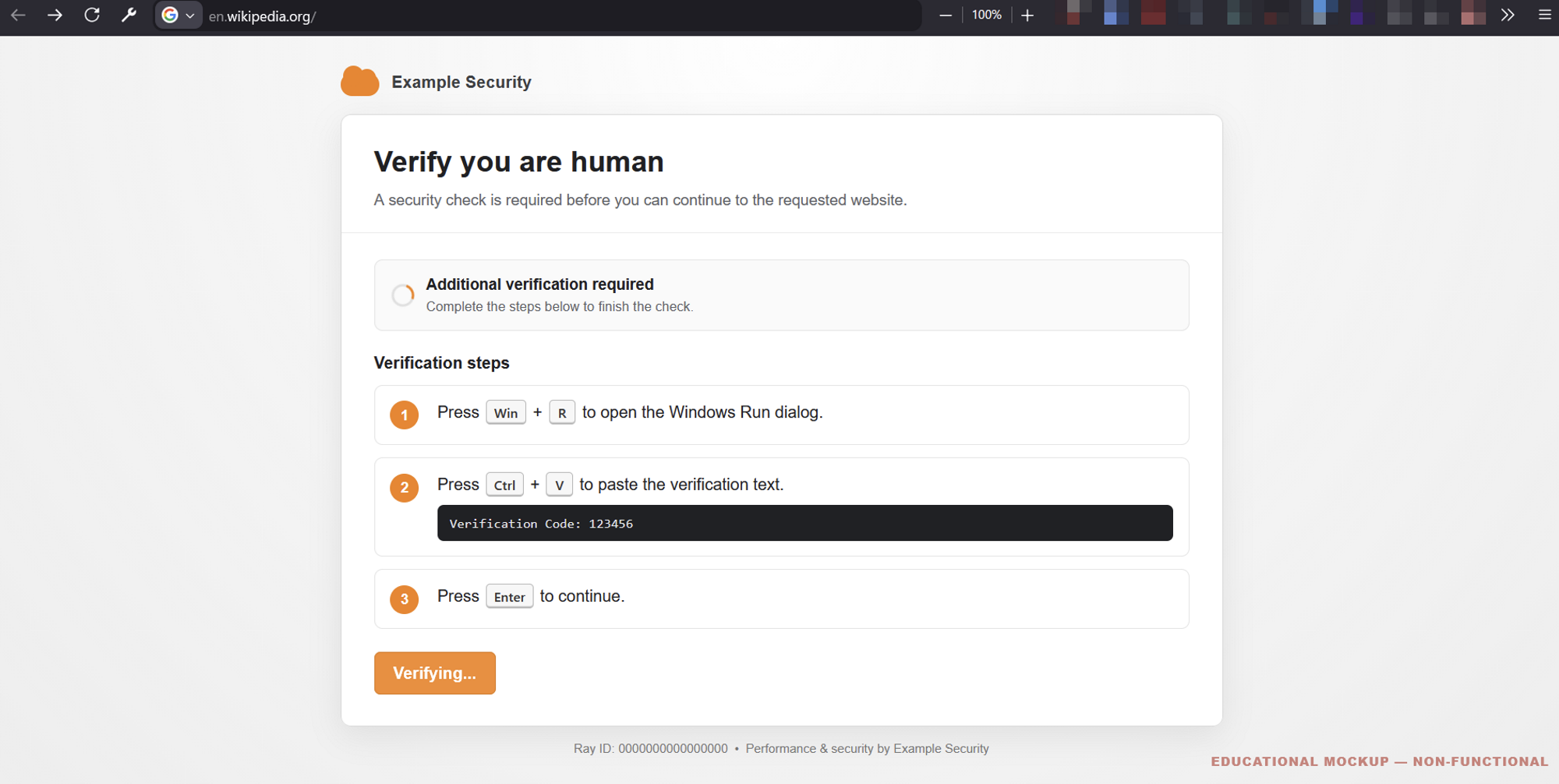
Unlike traditional phishing campaigns that deliver malicious email attachments or executable files through web browsers, these attacks persuade victims to execute commands themselves. When a user clicks a fraudulent “I am not a robot” checkbox, JavaScript embedded in the page uses the HTML5 Clipboard API (`navigator.clipboard.writeText`) to silently copy an encoded payload to the system clipboard.


The overlay then gives step-by-step directions: open the operating system’s execution interface, paste the copied string, and press Enter. On Windows, the user is told to press the `Windows Key + R` shortcut to launch the Run dialog. The pasted content is frequently an obfuscated PowerShell command or an instruction invoking `mshta.exe`.
On macOS devices, ClickFix directs users to open Terminal through Spotlight search (`Command + Space`) and run shell scripts. The payload is executed directly by native operating system binaries, a strategy classified as “Living off the Land” (LotL). That approach bypasses web browser download warnings, SmartScreen evaluations, and Mark-of-the-Web (MOTW) security flags that typically inspect incoming internet files.
Security analysts note that the method reduces the operational overhead for threat groups. By coercing victims into launching the initial payload directly, malicious operators do not need to build complex file delivery infrastructures, acquire trusted digital code-signing certificates from certificate authorities, or continually rotate command-and-control (C2) delivery domains to evade web domain reputation filters.
The primary payloads used in current ClickFix campaigns include the information-stealing malware Lumma Stealer, Vidar, Stealc, and Rhadamanthys. These programs are designed to exfiltrate browser credentials, cryptocurrency wallets, session cookies, and system telemetry. During enterprise intrusions, the initial command execution is also frequently used to drop secondary testing frameworks such as Cobalt Strike beacons, establishing persistent unauthorized access within corporate networks.
The campaign’s real-world impact is reflected in a surge of compromised users seeking remediation assistance on online community support forums, including Reddit, after inadvertently executing malicious command strings on personal and workplace devices.
Cybersecurity researcher Kevin Beaumont has highlighted one mitigation for organizations operating within the Microsoft Windows ecosystem: disabling the system’s Run interface entirely for standard users. In corporate Active Directory and Windows enterprise environments, network administrators can enforce that control through Group Policy Objects (GPOs).
The relevant path is `User Configuration -> Administrative Templates -> Start Menu and Taskbar`, where administrators can enable the policy setting “Remove Run menu from Start Menu.” The policy disables the `Windows Key + R` keyboard shortcut, removes the Run option from the Start menu, and prevents users from executing unverified system commands through the dialog box.
Restricting administrative utilities such as the Run prompt across an entire organization is a stringent operational posture and may not be feasible or necessary in every enterprise environment, especially those that rely heavily on administrative scripting or developer workflows. Other technical controls include enforcing PowerShell Constrained Language Mode (CLM), enabling Attack Surface Reduction (ASR) rules within Microsoft Defender for Endpoint to block child process creation from command-line tools, and using Mobile Device Management (MDM) solutions to restrict command execution privileges on macOS endpoints.
Microsoft and Apple, along with web browser developers, are actively engineering technical countermeasures to detect and suppress Clipboard API manipulation and suspicious command-line invocations. Despite those defensive efforts, threat actors continue refining their social engineering frameworks and code obfuscation methods, maintaining an arms race that security researchers warn will persist as long as end-users remain susceptible to manipulative web instructions.