

Google Takes Gemini Beyond Chrome With Native Windows and Mac Apps
Google brings Gemini into the operating system with native desktop apps and autonomous workflows

MOUNTAIN VIEW, Calif. — Google has launched dedicated Gemini desktop applications for Windows and macOS, moving its artificial intelligence assistant beyond the web browser and onto local operating systems. The release places Gemini alongside Microsoft Copilot and Apple Intelligence as a system-level assistant, while Google shifts away from relying primarily on Chrome as its consumer desktop gateway.
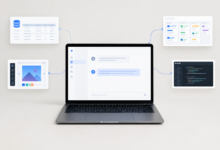
The applications are designed to remain in the background without degrading system performance, appearing in the Windows system tray or macOS menu bar until summoned. Users can trigger Gemini with customizable keyboard shortcuts: `Alt + Space` opens an overlay over active applications on Windows, while macOS users can press `Option + Space` for a compact “mini chat” window or `Option + Shift + Space` for the full-screen interface.
Google’s desktop expansion also includes dedicated creative workspaces. From the applications, users can generate graphics with “Nano Banana” or begin high-quality video projects through “Gemini Omni.” Screen-sharing tools are available through the “Add files and tools” option and its “Share window” control, allowing Gemini to interpret live visual information such as a complex financial chart or data displayed in third-party software.

The two versions target different hardware environments. The Windows application works with Windows 10 and Windows 11 and runs natively on traditional x64 processors from Intel and AMD as well as newer Arm64 chips. That includes the latest Copilot+ PCs powered by Qualcomm Snapdragon processors. The macOS application requires Apple Silicon M-series hardware and macOS Sequoia, version 15.0 or later, matching the hardware and software limitations Apple has established for Apple Intelligence.
A single Google account synchronizes chat history, preferences, and memory across mobile, web, and desktop clients. On macOS, users who want Gemini to read full web pages in browsers must grant the application Accessibility permissions through macOS System Settings. The desktop apps are also intended to run continuously in the background of personal computers rather than remain limited to a browser tab.
Google calls its agentic workflow system “Gemini Spark.” Instead of responding only to individual prompts, Spark can perform multi-step digital chores. On macOS, it can work with local files and directory structures—for instance, sorting downloaded PDFs into folders according to their content or parsing invoice files to create a structured budget spreadsheet. Google says Spark can access only the directories and files for which the user has granted explicit permission.
Spark also supports real-time topic tracking. Users can configure it to watch stock market thresholds, sports scores, weather updates, blogs, and social media platforms, then receive automatic updates and analytical reports when a specified event occurs. Google has separately previewed a remote execution feature that will let users control Gemini Spark on a desktop from a mobile phone, such as locating a sales report on a home office Mac, extracting selected data points, and emailing a summary.
Gemini Spark for macOS is currently available in Beta to Google AI Ultra subscribers, part of the Google One AI Premium tier, who are at least 18 years old and located in the United States. Mac users currently receive the broader set of desktop automation features, while Google plans to bring the native capabilities to Windows users over time.
The assistant is being opened to outside software through support for the Model Context Protocol, or MCP. The open-source standard was originally developed to standardize how AI models connect with data sources and tools. Developers and enterprise users can use MCP to create custom links between Gemini Spark and proprietary corporate databases or specialized software.
Gemini Spark connects out of the box with Google Workspace services, including Gmail, Google Drive, Docs, Calendar, Google Tasks, and Google Keep. A user could request a cross-referenced summary that combines task-list items scattered across brain-dump notes in Google Keep. Integrations are also rolling out for Dropbox and Canva, as well as Instacart, OpenTable, and Zillow Rentals. Those third-party connections are scheduled to reach web and mobile users first, with macOS integration following shortly afterward.
The native release draws on more than ten years of research from Google’s AI divisions. In 2013, Google researchers published the Word2Vec paper, which pioneered mapping words as mathematical vectors so algorithms could understand semantic relationships. In 2015, Google introduced a neural conversational model that showed machine-learning frameworks could predict logical follow-up sentences in a conversation.
Google researchers published “Attention Is All You Need” in 2017, introducing the Transformer architecture that became the foundation for nearly all modern Large Language Models, including the GPT series and Gemini. In 2020, the company demonstrated advanced multi-turn chat capabilities and refined how models maintain context across long dialogues.
Under its self-imposed AI Principles, Google launched “Bard” as a public experiment in March 2023. Bard was rebranded as Gemini in early 2024 to reflect the underlying multimodal model architecture. The latest desktop release moves these cloud-derived capabilities into a localized, system-level assistant, marking a new chapter in how users interact with personal computers.








2 Comments