iOS 27 Gives Apple’s Image Playground Touch Controls
Touch-based editing and natural language style prompts arrive for supported iPhones, iPads and Macs.
Apple expanded the capabilities of its on-device image generator this fall, introducing touch-based editing and natural language style prompts in the iOS 27 update to Image Playground. The changes shift the tool from a rigid template system into a more flexible editor.
Users can now select specific elements within a generated image using their finger and issue text commands to alter them. If the app produces a cabin, a user can tap the door and type a prompt to change its color or reposition it. Earlier versions required users to regenerate entire images to fix isolated details.
The update also removes fixed visual categories. Instead of choosing between preset options like illustration or sketch, the new “Any Style” mode accepts natural language descriptions for virtually any visual approach. Apple said the release additionally enables users to generate Contact Posters and Lock Screen wallpapers directly within the app.

Image Playground originally launched in December 2024 as part of the broader Apple Intelligence rollout. Unlike cloud-dependent competitors such as Midjourney or DALL-E, Apple processes these generations locally on device hardware. The tool integrates directly into Messages, Keynote and Freeform, allowing users to generate and insert assets without switching applications.

Running the software requires an iPhone 15 Pro, iPhone 15 Pro Max, or any iPhone 16 model or newer with Apple Intelligence enabled. iPad support is limited to models with an M1 chip or later, including the iPad Mini equipped with the A17 Pro processor. Macs require at least an M1 chip.
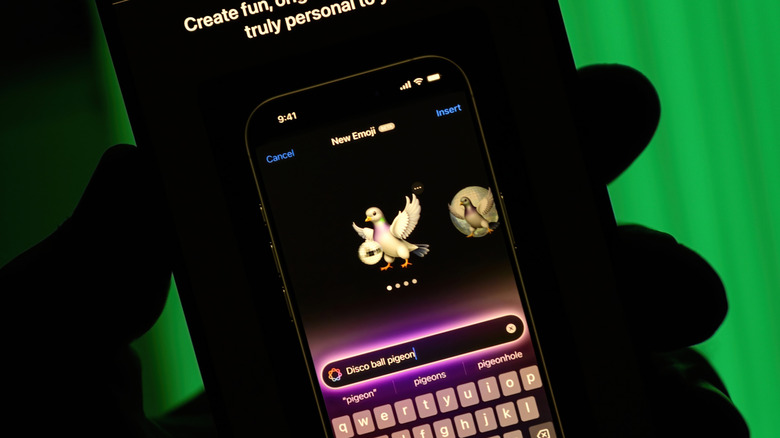
To create an image, users enter a description in the prompt box or expand a menu to apply styles, including animation. Selecting Genmoji — personalized stickers generated through Apple Intelligence — saves the output alongside standard emoji for use in text exchanges.
The app also accepts reference photos. Tapping the person icon near the prompt box allows users to pull a face from their photo library and place it into generated scenarios, such as rendering themselves as an astronaut. A separate button lets users upload a recently taken photograph as the foundation for a new image, which can then be modified using the new touch controls or additional text prompts before being shared.