DVI to HDMI Adapters: How Legacy Video Connections Work in 2026
Passive adapters bridge old graphics cards to modern displays, but audio routing and resolution ceilings require careful planning.
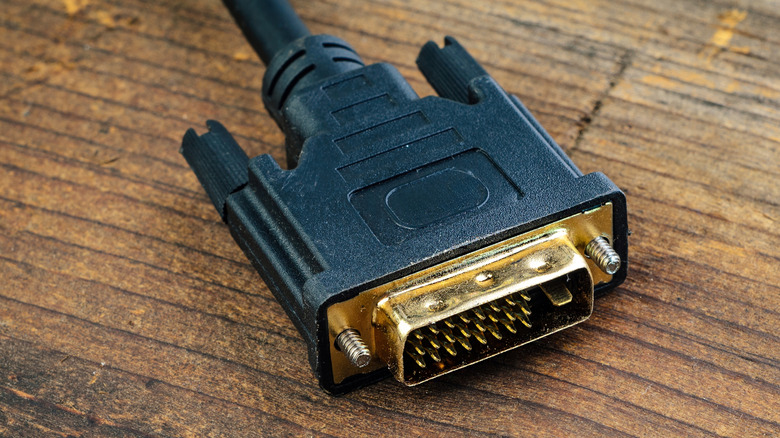
Connecting older computer hardware to modern displays remains a daily reality for IT departments, retro computing enthusiasts, and offices running legacy equipment. The Digital Visual Interface standard, introduced by the Digital Display Working Group in 1999 and popularized by early adopters like Apple’s Cinema Display, still surfaces on aging graphics cards, industrial control panels, and office projectors. Because DVI and HDMI share the same underlying Transition Minimized Differential Signaling (TMDS) protocol, bridging the two formats requires nothing more than a passive adapter that physically reroutes the pins.
No conversion chip or external power source is necessary for digital-to-digital connections. Both DVI-D, which carries only digital signals, and DVI-I, which combines digital and analog pins within a single connector, interface directly with HDMI ports through these inexpensive adapters. Retail kiosks, point-of-sale terminals, and medical imaging stations built before 2015 frequently rely on this exact setup to remain operational without replacing expensive specialized hardware.
The primary limitation of adapting DVI to HDMI is audio. The original DVI specification was engineered exclusively for video transmission. While HDMI carries multi-channel uncompressed audio alongside the video signal, a passive DVI-to-HDMI adapter will not transmit sound. Users must route audio separately through a 3.5mm auxiliary cable, USB audio interface, or Bluetooth connection. Some specific graphics cards from the late 2000s, particularly certain AMD and NVIDIA models, were engineered to push audio through the DVI port using a proprietary internal jumper cable connected to the motherboard’s audio header. When paired with a specialized active adapter, those rare configurations can output both audio and video over a single HDMI line, but this behavior is an exception rather than the rule.


Resolution and refresh rate constraints define where DVI setups hit a hard ceiling. A Single-Link DVI connection utilizes one TMDS transmitter, capping bandwidth at 1,920 x 1,200 pixels at 60Hz. Dual-Link DVI doubles the available data lanes, pushing the maximum resolution to 2,560 x 1,600 at 60Hz. Attempting to drive higher resolutions over Dual-Link DVI forces the refresh rate down to cinematic frame rates, resulting in noticeable cursor lag and motion blur that makes general computing uncomfortable. For context, modern high-refresh-rate gaming monitors routinely demand 4K resolution at 144Hz or higher, a throughput requirement that exceeds DVI’s physical architecture entirely.
The sole variant that cannot use a simple passive adapter is DVI-A. This purely analog format, which was rarely implemented in consumer electronics compared to its digital counterparts, requires an active converter equipped with a digital-to-analog processing chip to communicate with an HDMI display. Misidentifying a DVI-A port as DVI-D is a common troubleshooting error when an adapter fails to produce an image. Visually, DVI-I and DVI-A connectors feature four additional pins surrounding the flat horizontal blade on the side of the plug, whereas DVI-D lacks those four pins entirely.
Physical design also complicates long-term deployment. The wide connector profile and mandatory thumbscrews make DVI cables difficult to route through modern cable management trays or slim monitor arms. The stiff shielding required to prevent electromagnetic interference across the numerous pins adds bulk behind displays, often preventing monitors from sitting flush against walls in space-constrained environments.
Modern standards have eliminated these friction points while vastly expanding bandwidth. DisplayPort 2.1b supports daisy chaining, allowing multiple monitors to run sequentially from a single output port—a capability DVI never natively supported without expensive Multi-Stream Transport hubs. Meanwhile, the HDMI 2.2 specification accommodates resolutions up to 16K, dynamic HDR metadata mapping, and enhanced Audio Return Channel (eARC) synchronization. Neither modern standard relies on mechanical screws for retention, utilizing friction-fit designs that support thinner cables and tighter bend radii.
As of October 2026, major GPU manufacturers including NVIDIA, AMD, and Intel no longer include native DVI ports on any current-generation consumer or professional graphics cards, having fully transitioned to HDMI 2.1 or 2.2 and DisplayPort 1.4 or 2.1b outputs across their entire product stacks.